
The Bunnings Workshop community can help with your home improvement projects.
- Bunnings Workshop
- >
- Discussion
- >
- Whole of House
- >
- Re: Orion Smart Grid Connect Garage / Ga...
Orion Smart Grid Connect Garage / Gate Opener
- Subscribe to RSS Feed
- Mark Topic as New
- Mark Topic as Read
- Float this Topic for Current User
- Bookmark
- Subscribe
- Mute
- Printer Friendly Page
Share


- Mark as New
- Bookmark
- Subscribe
- Mute
- Subscribe to RSS Feed
- Highlight
- Report Inappropriate Content
Orion Smart Grid Connect Garage / Gate Opener
Now I have touched on this subject in brief across various other articles but I thought it may be best to bring it all together for a comprehensive article I to the fabulous affordable little device.
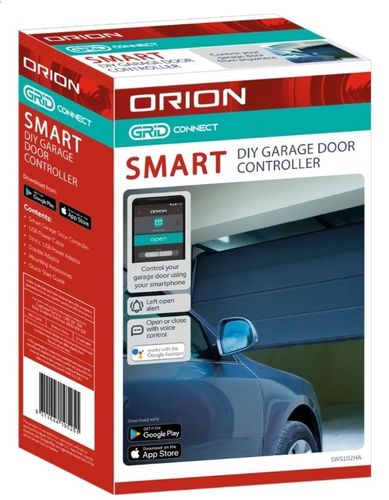
So what is this $46.00 Orion Grid Connect Garage Door Opener and what can it do?
* Open and close your garage door or motorised gate when ever Wifi is present
* Open and close your garage door or motorised gate via voice command when connected to Google Home.
* Send you notifications when the door or gate is open and or remains open for as set amount of time.
* Remote open from anywhere in the world provided Wifi is present at the device.
* With the use of automations can trigger other smart devices and lights.
* With the use of Grid Connect geofencing is able to be used to open or close as you leave or enter without any other commands.
* Can be removed and moved to new premises.
Note. 2.4ghz wifi is required.
So what's in the box of the device?
* A control device with magnetic contact cable attached, cable with tail for motor terminals
* USB cable and power block
* Double Adaptor
* Double sided tape and cable clips
* Instructions
Now the magnetic contacts will be terminated in either 2 ways as per below depending on the door setup.
* One way is over head where the panel lift motor is centre and behind the panel
* The other is to the side and is as pictured below.
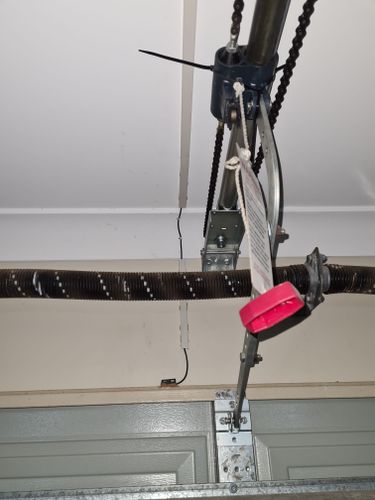
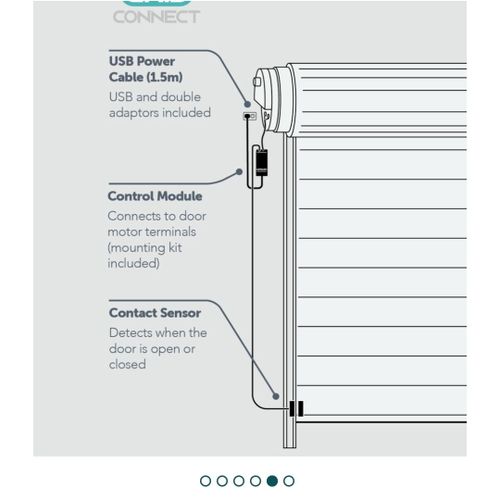
The contacts can be installed with the supplied double sided tape, I tend to use a dab of silicon as well or in this case went a bit nuts with liquid nails this just ensures the tape doesn't let go.
For the fixing of the cable if you are a permanent resident I suggest either using the supplied cable clips or using some cable trunking with double sided tape and a straight edge to apply it.
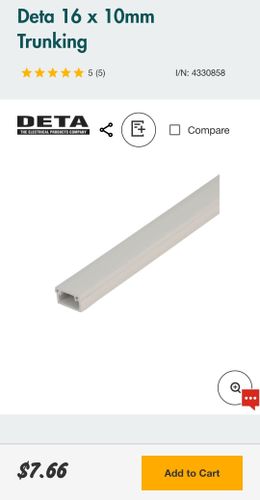
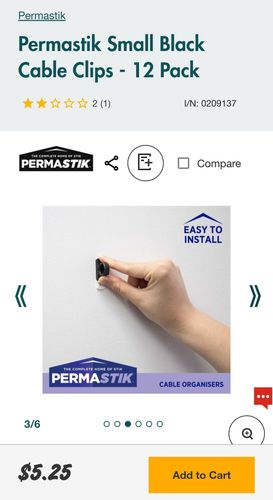
If you are renting and would like to take it with you to the next premises the I suggest some double sided cable clips that are removable like below.
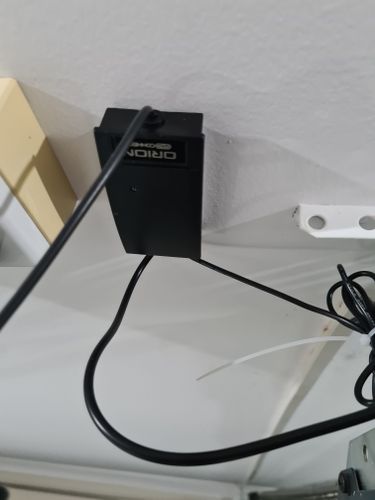
The controller fixedly with the supplied double sided tape and can be stuck to the side of the motor or roof, the USB plugs into the ceiling mount GPO with the power block and double sided adapter if required.
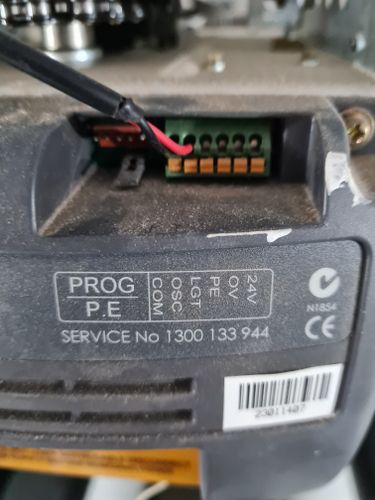
Now the other cable that has nothing on the end but bare wire it will be terminated into the motor control terminals. These are extra low voltage terminals 5 - 24 VDC depending on motor
Follow the instructions but Red will go into OSC (open shut close) and Black COM (common) unless stated in the instructions.
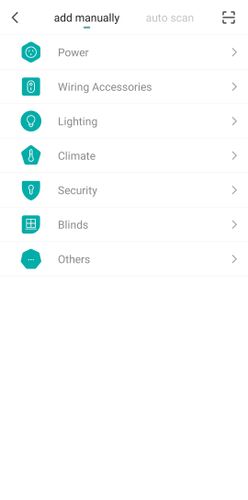
Now that everything is connected let's turn it on, the instructions will ask for yoi to open your Grid Connect App and then hold down then button on the garage controller for 5 sec. Click on the + symbol and then Other the device will show up and step through to add it.
Once it is setup it will open the device and you can click on the button open / close give it a try....
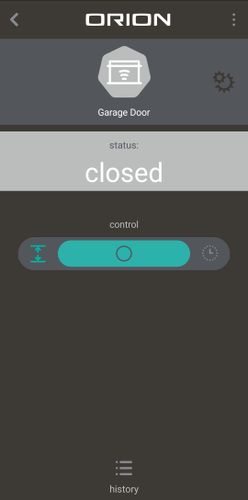
Now click on the settings icon top right hand side.
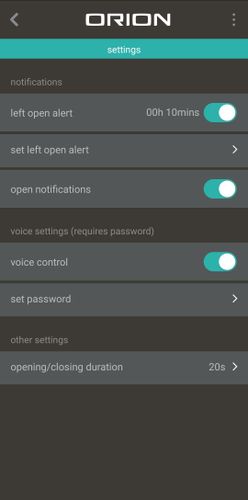
Now have a look at the 2 first options I have set both of these to 10 min this is the alert when it is left open.
The 3rd Open notification I have on as well.
The 4th the voice control is so you can open it via Google Home voice on your phone or your car a pin code must be set for this but if you don't want a pin then follow my tutorial here.
https://www.workshop.bunnings.com.au/t5/Whole-of-House/Grid-Connect-Tips-Tricks-and-Help-Please-post...
If you require help setting up Google Home you can follow my post below.
https://www.workshop.bunnings.com.au/t5/Whole-of-House/Bringing-multiple-smart-brands-into-one-app-G...
If you would like to set up Geofencing to open the garage or gate then you.
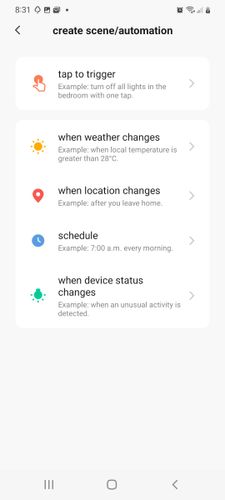
* Create a new scene
* Click when location changes
* Click when arriving
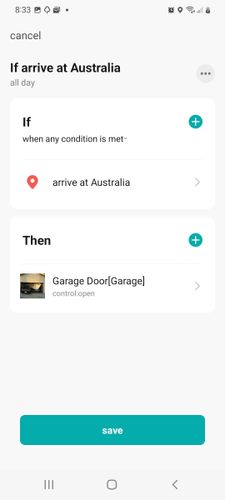
* Set your home pin
* Then condition click the garage or gate control and select open.
* Click save.
The same can be done for close on leaving.
And finally to see it in action have a look at my following short video.
So as you can see this little cost effective can sit in very nice with your home automation systems or as a complete stand alone. Personally I know it's one of the better products added to my many for ease of lifestyle.
As always any questions or comments please post below.
Happy Automations Bunnings Peeps
Carl.
- Mark as New
- Bookmark
- Subscribe
- Mute
- Subscribe to RSS Feed
- Highlight
- Report Inappropriate Content
Re: Orion Smart Grid Connect Garage / Gate Opener
Hey mate see how you have the 2 OSC wires together in the 1 terminal, have you tried the 2 ground wires in the 1 GND terminal or have you tried the Orion in either of the grounds and it works fine? Just incase that ground is connected for the 35V rail and not the OSC ?? Electronics can be funny if it is OV and not ground but mislabeled.
My only other thought is that your existing remote is in the opposite state of the Orion eg Normally Closed or Normally Open so it's opposing it. With them both hooked up can you see on your app on your phone if it is changing state?
Otherwise your existing might be using active switching rather than 0v switching, the OSC won't care but the Orion might the only way to tell is with a multimeter on DC Voltage and measure across the OSC/Ground terminals with just the existing and see if you see between 5-12V . If you do the only work around here is a small DC relay of the same voltage so that you can switch 0V from the Active Voltage.
This is all speculation of course but just putting some ideas down to you.


- Mark as New
- Bookmark
- Subscribe
- Mute
- Subscribe to RSS Feed
- Highlight
- Report Inappropriate Content
Re: Orion Smart Grid Connect Garage / Gate Opener
Hello @hung_pham85
I would also suggest forwarding your query to techenquiries@arlec.com.au or call 1300 267 168 for more technical advice.
Eric


- Mark as New
- Bookmark
- Subscribe
- Mute
- Subscribe to RSS Feed
- Highlight
- Report Inappropriate Content
Re: Orion Smart Grid Connect Garage / Gate Opener
Hi @CSParnell ,
I have tried your suggestion and I believe that I may need a small DC relay for the existing remote receiver - ill pop into Jaycar to get some advice.
Thanks for all your help
- Mark as New
- Bookmark
- Subscribe
- Mute
- Subscribe to RSS Feed
- Highlight
- Report Inappropriate Content
Re: Orion Smart Grid Connect Garage / Gate Opener
- Mark as New
- Bookmark
- Subscribe
- Mute
- Subscribe to RSS Feed
- Highlight
- Report Inappropriate Content
Re: Orion Smart Grid Connect Garage / Gate Opener
Just be aware to activate a relay you will voltage so just check that the OSC and GND is outputting a voltage on change of state and simply not just changing a state from high to low.

- « Previous
-
- 1
- 2
- Next »
Why join the Bunnings Workshop community?
Workshop is a friendly place to learn, get ideas and find inspiration for your home improvement projects
You might also like



We would love to help with your project.
Join the Bunnings Workshop community today to ask questions and get advice.