Workshop
Ask a question

The Bunnings Workshop community can help with your home improvement projects.

How to fix auto line feed on Ryobi line trimmer?

newuser
Getting Established

How to fix auto line feed on Ryobi line trimmer?

Since purchasing my trimmer, the line feed does not automatically adjust to the desired length. I constantly have to stop, readjust the line feed, and try again. This has become a consistent problem, and I'm wondering if it's an issue with the machine itself or if I'm doing something wrong. I've followed the instructions in the video here: https://www.youtube.com/watch?v=Hq8vARv8elU

Has anyone else encountered this issue? If so, could you suggest how to fix it?


Model Number: OLT1832

Model Name: Ryobi 18V ONE+ 25/30cm Cordless Line Trimmer - Tool Only

MitchellMc
Bunnings Team Member

Re: Has anyone experienced issues with the auto line feed on their Ryobi trimmer?

Hi @newuser,


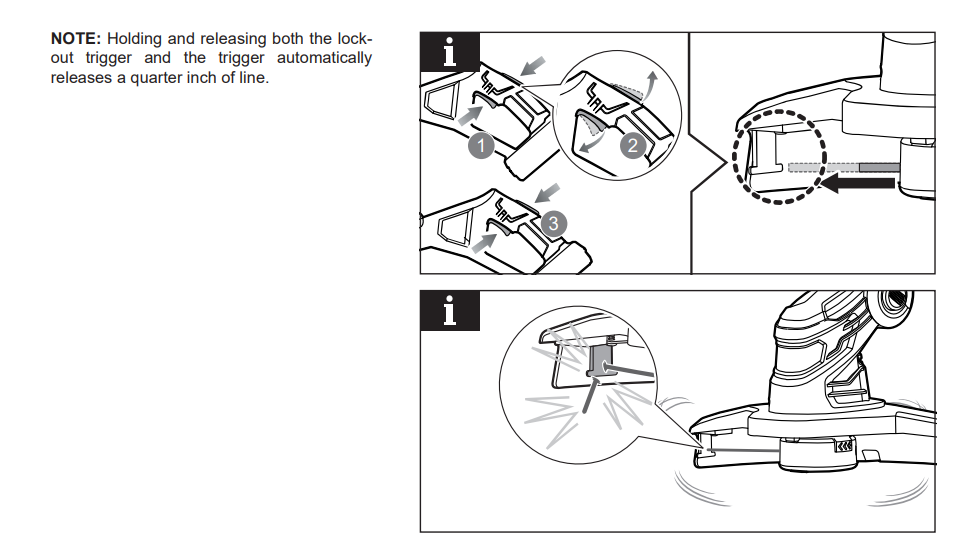
It sounds like the problem might come down to how the auto-feed system works on the Ryobi OLT1832 rather than a fault with the machine. The line feed is actually triggered each time you pull the trigger—each time you do, it releases about a quarter inch of line. This system is designed to work well when you're doing shorter bursts of trimming, as it gradually keeps the line at full extension.


However, if you’re holding the trigger down for a long time and trimming a larger section, you might chew through quite a bit of line without giving the system a chance to feed more out. So, when you stop and then start trimming again, it only releases that small quarter inch—slightly longer than what’s left—but not enough to get it back to a usable length. In that case, the solution is to pulse the trigger a few times—each time you do, it will feed a little more line. Keep doing that until the line reaches the built-in cutter on the guard and trims itself to the correct length.


If the auto-feed still doesn’t seem to be working after several trigger activations, you can also use the manual feed button on the head to release more line. That said, most people find it easier and quicker to just flick the trigger a few times to get the line to the right length. 


If you continue to have issues with the machine, it might be worth taking it back to the store and having our team assess it under warranty.


Please let me know if you have any questions.


Mitchell


See something interesting? Give it the thumbs up!

Re: Has anyone experienced issues with the auto line feed on their Ryobi trimmer?

@MitchellMc Thank you for your quick response.

I've been using the trimmer in short bursts, but the problem persists.

I've been relying on the manual feed, and it's quite frustrating to have to do it multiple times each use.

Why join the Bunnings Workshop community?

Workshop is a friendly place to learn, get ideas and find inspiration for your home improvement projects