So you've bought a heap of Grid Connect gear like me but your security cameras are Swann and then on trip to Bunnings you notice so bargin priced Wiz globes and some Lytworx smart party lights that you must have and now you have multiple apps on your phone and you want to control them all together.
Well you can do this under Google Home.
https://play.google.com/store/apps/details?id=com.google.android.apps.chromecast.app
https://apps.apple.com/au/app/google-home/id680819774
Google Home let's you import a lot of apps into its platform and assign them to a home and then to areas or rooms from there you can control a whole room that is every light or you can click into the room and control individually.
You can also create routines as per below.
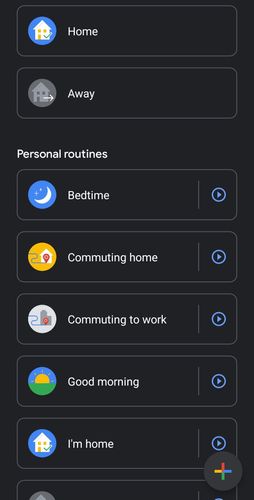
You can control all your devices by voice commands by "hey Google" through your phone, Google Mini, Google Nest and so on for instance you can say " Hey Google turn on family room lights" and they will turn on provided there is power to the globes.
Below is what the interface looks like with a mix of brand of smart devices.
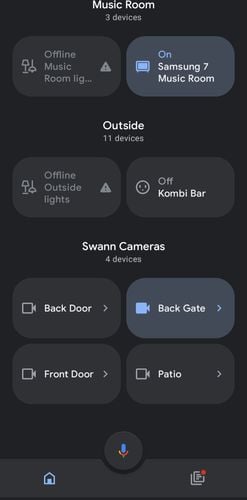
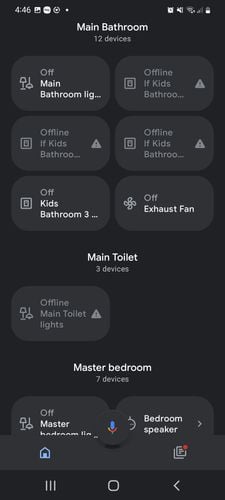
And below is where the apps are brought into Google Home
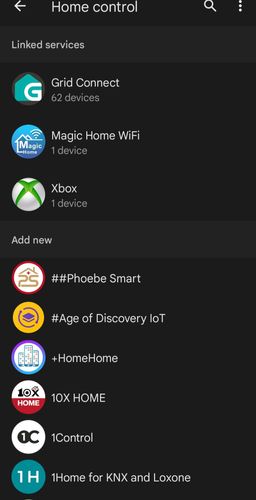
You still must have the original apps running on your device to bring them into Google Home but once they are in and setup correct the control of devices becomes a lot easier especially across brands.
If you do decide to go down this path spend the time setting up each room correctly as it helps with correct voice commands and any scenes and automations you have setup within your original apps still will work Google Home sees these and executes the automation.
So I hope this brief overview in bringing multiple brands smart devices together helps you out some and any questions please post below.
Happy automating all.
Carl